How Interactive 3D Parts Catalogs Connect Components to Engineering Information

- Industry
- Manufacturing
- Location
- Global
- Goals
- Improve execution consistency of service operations
- Type
- B2B
Technology used
-

-
Ausrine
Digital Twin Experience Platform for sales, aftermarket and operational intelligence
-

-
Progressive Web App
Cross-platform app targeting different devices and form factors
Industrial equipment information is often scattered across drawings, parts catalogues, documents and service procedures. Interactive 3D parts catalogs connect components to their associated information, making it easier to identify parts and access relevant engineering and service data across manufacturing, maintenance and aftermarket operations.
Industrial equipment relies on extensive technical information - engineering drawings, bills of materials (BOMs), illustrated parts catalogues (IPCs), specifications, maintenance documents and service procedures.
In many manufacturing organisations, this information already exists across engineering systems, document repositories and enterprise applications. The challenge is accessing the right information when and where it is needed.
Consider a maintenance technician replacing a bearing in an industrial pump. Before starting the work, the technician needs to identify the correct bearing, verify its part number, check its specifications and locate the relevant replacement procedure.
Finding this information may involve moving between an assembly drawing, a parts list and one or more document repositories. The technician must also ensure that the selected component corresponds to the correct equipment variant.
The relationship between a physical component and its associated engineering and service information is not always easy to navigate.
A different approach is to make the component itself the starting point for accessing that information.
From Engineering Drawings to Interactive 3D Parts Catalogs
Engineering drawings and parts catalogues provide essential information about equipment and its components. However, identifying a specific component in a complex assembly can require users to interpret drawing references, locate part numbers and cross-check information across separate records.
An interactive 3D parts catalog offers another way to navigate this information.
Users can interact with a 3D representation of the equipment, select individual components and access the information associated with them, rather than relying only on drawing references or part numbers.
The distinction is important. A 3D model by itself represents the geometry and spatial arrangement of equipment. Making it interactive allows users to select and examine individual components. Associating those components with structured product information adds another layer: the 3D model becomes a visual interface for accessing relevant engineering and service records.
This becomes particularly useful for complex equipment containing multiple assemblies, subassemblies and product variants. As product complexity increases, identifying the correct component and locating its corresponding information can become more demanding. Component-level associations provide a more direct way to navigate these relationships.
The Component as the Starting Point
Consider the pump bearing replacement scenario.
A technician opens the relevant pump assembly in an interactive 3D parts catalog and selects the bearing. The application uses the component's association with configured data sources to retrieve the corresponding information.
Depending on the available records, this may include:
- Part number and associated BOM or IPC records.
- Component specifications and technical details.
- Engineering drawings and supporting documents.
- Relevant images and videos.
- Maintenance or replacement procedures associated with the component.
Instead of starting with a drawing reference or searching for a part number, the technician can begin with the component's location within the assembly and access its associated information.
The objective is not to replace engineering drawings or enterprise systems. It is to make the information held in those systems easier to access in the context of the equipment.
Where Interactive 3D Parts Catalogs Can Be Applied
The value of component-linked information extends beyond maintenance. It can support different activities across manufacturing, service and aftermarket operations.
Manufacturing and assembly
Assembly teams work with product structures, component specifications, engineering drawings and work instructions.
When these resources are accessed separately, workers may need to cross-reference information to identify the correct component or understand its position within an assembly.
An interactive 3D parts catalog can provide a visual reference for locating components and accessing their associated information. Where assembly procedures are available, linking them to the relevant component or assembly can provide additional procedural context.
This can be useful for complex assemblies and products with multiple configurations.
Equipment maintenance
Maintenance work frequently involves identifying a component before inspecting, replacing or repairing it.
For example, when replacing a pump bearing, a technician may need to confirm the component's part number, review its specifications and consult the applicable maintenance procedure.
A component-linked 3D experience can bring these resources closer to the equipment representation. Selecting the bearing provides access to its associated information and the relevant maintenance procedure.
This does not remove the need for maintenance planning, safety checks or technical verification. It provides instant access to the information required during the task.
Field service
Field service engineers often work with equipment installed at customer locations. They may need to identify components and consult technical information while diagnosing an issue or carrying out service work.
An interactive 3D parts catalog can provide a visual reference for component identification and access to associated documents and procedures through supported devices.
The usefulness of this approach depends on the availability and accuracy of the underlying information, as well as the devices and systems supported in the field-service environment.
Aftermarket and spare parts identification
Aftermarket teams need to identify the correct replacement parts for equipment and its variants.
A visual representation linked to structured parts information can help users navigate complex assemblies and locate associated component information.
Where enterprise integration is configured, component information can also be connected with supported ERP workflows. The specific workflows depend on the integration and the organisation's existing processes.
Beyond Component Identification: Making the 3D Experience More Useful
An interactive 3D parts catalog should do more than allow users to select components. It should also help them examine equipment assemblies and understand the relationships between individual parts.
Three visualisation capabilities are particularly useful when working with complex equipment.
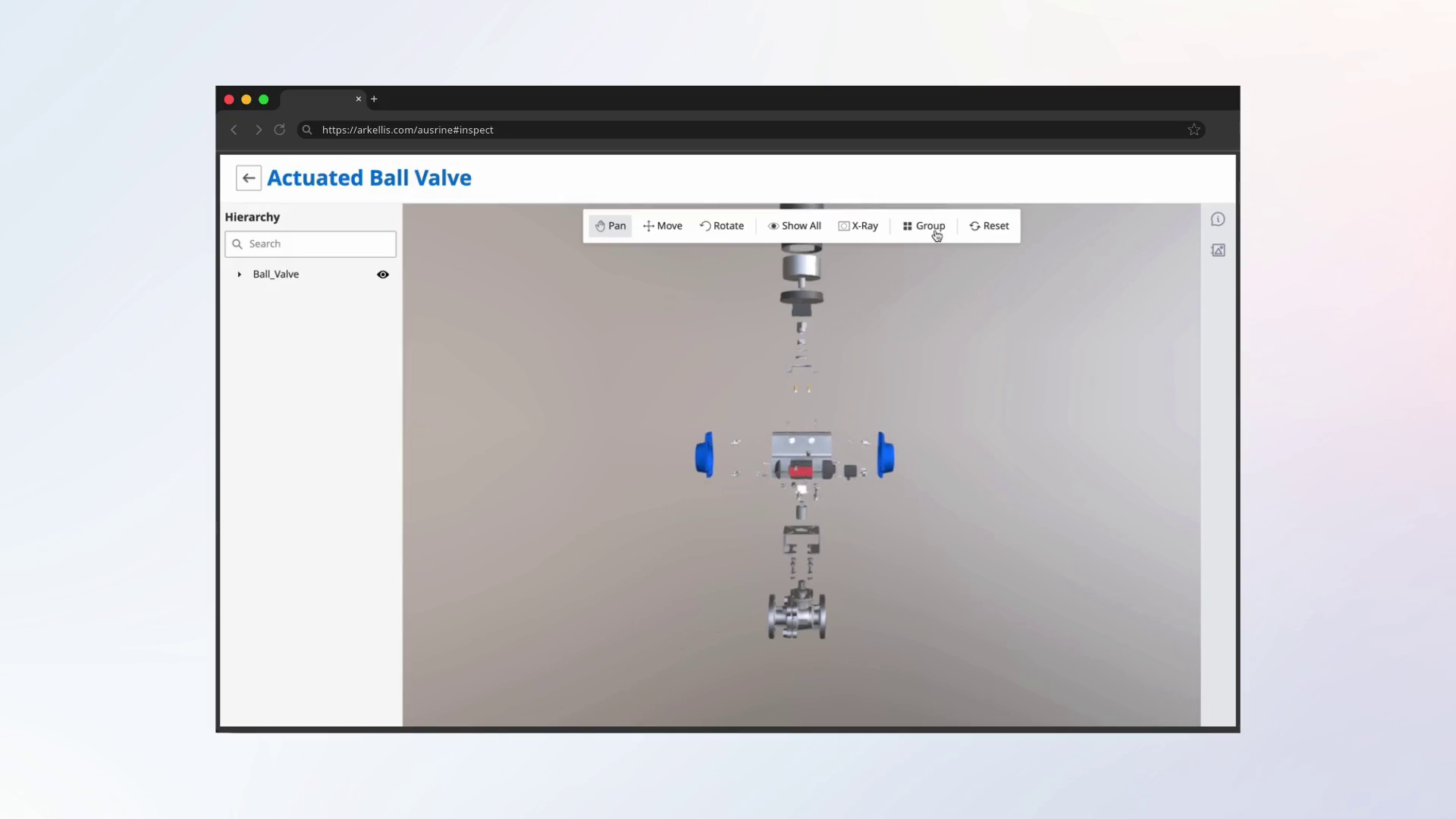
Exploded View
An exploded view separates components or subassemblies visually, making their arrangement and relationships easier to examine. It helps users understand how individual parts fit together within a larger assembly.
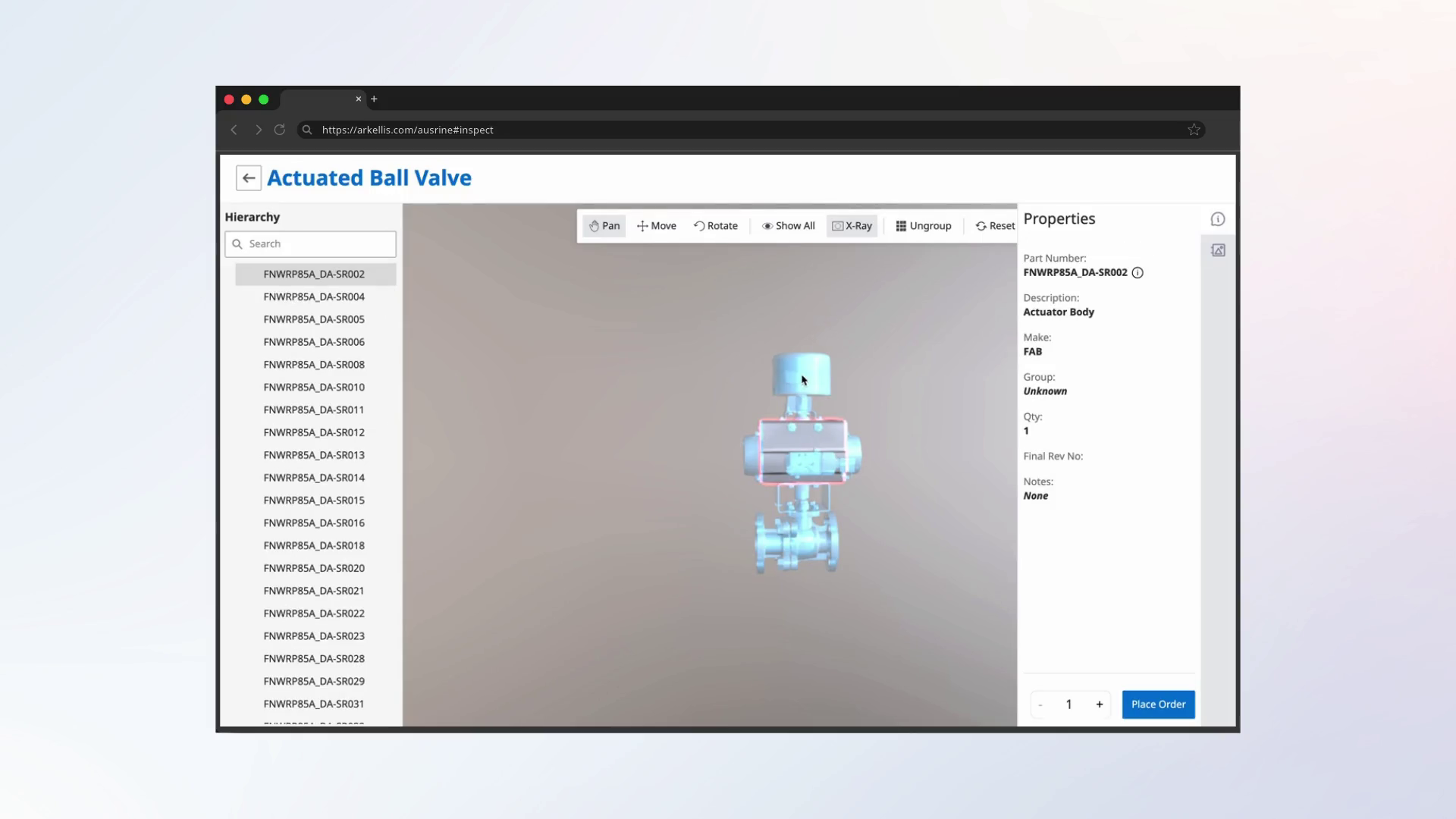
X-ray View
An X-ray view makes internal or concealed components visible by reducing the visual obstruction caused by surrounding geometry. This helps users examine components that may otherwise be difficult to locate within an assembled model.
Access to BOM and IPC Information
Visualising an assembly helps users understand its structure. Associating individual components with BOM and IPC records adds another layer by providing access to their corresponding parts information.
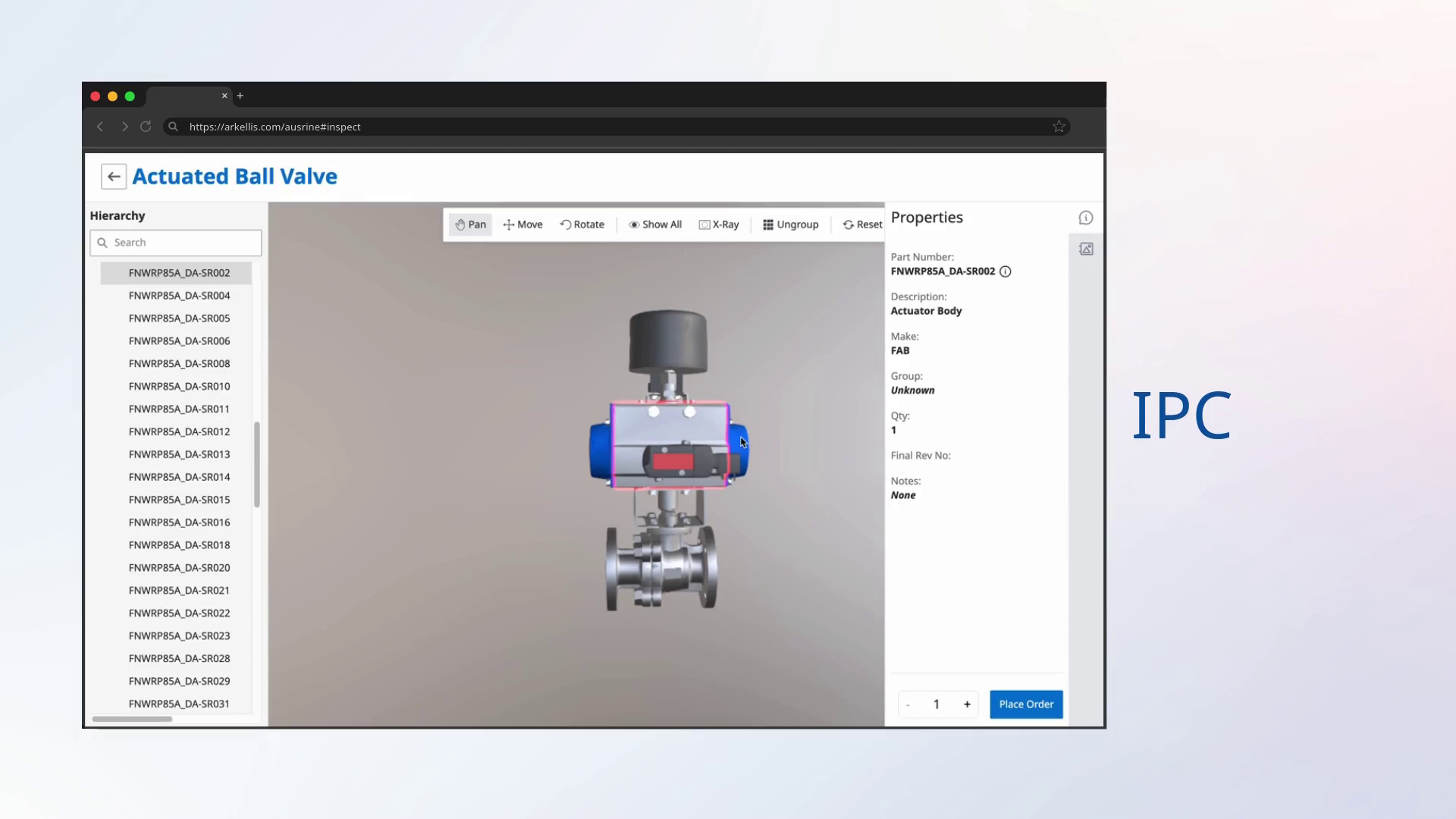
Together, these capabilities support three related activities - understanding the assembly, locating individual components and accessing their associated information.
Connecting Components with Procedures and Service Information
Identifying a component is only part of a maintenance or service activity. Technicians also need guidance on how to inspect, remove, replace or assemble it.
Interactive 3D work instructions can provide this guidance through visual, step-by-step procedures. By associating these procedures with individual components or complete assemblies, users can access relevant instructions in the context of the equipment they are working with.
For example, a technician working on a pump bearing can access its associated part information alongside the relevant bearing replacement procedure.
This brings together two important forms of information:
- Product information: What is the component? What are its specifications and associated records?
- Procedural information: What steps need to be followed to inspect, maintain or replace it?
A parts catalog helps users identify and understand components. Linking it with interactive procedures extends that experience to the tasks performed on the equipment.
Bringing Engineering Information Together
Ausrine Inspect brings this approach into practice through interactive 3D assemblies connected to associated product and service information.
Users can select individual components to access their associated BOM/IPC records, engineering drawings, documents, images and videos from configured data sources. Visualisation capabilities such as exploded and X-ray views help users examine equipment and understand its component structure.
The experience also extends to procedural guidance. Interactive 3D procedures created using Ausrine Composer can be associated with individual components or complete assemblies and accessed through Inspect.
The following demonstration showcases Ausrine Inspect's capabilities, from exploring 3D assemblies and identifying components to accessing associated information.
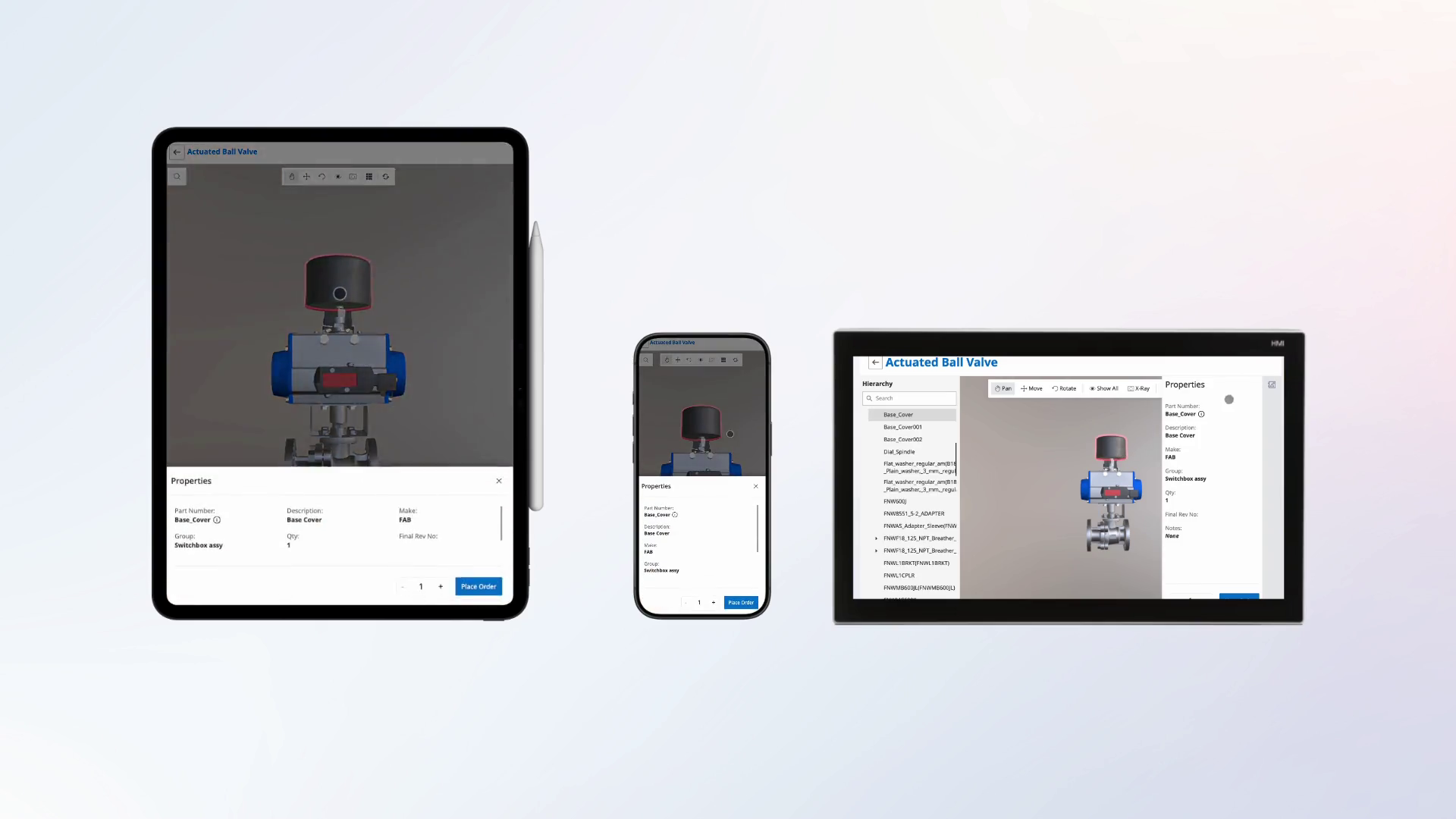
Ausrine Inspect is designed for access across different device environments, including desktop computers, laptops, mobile devices and compatible HMI environments. This allows users to access the interactive 3D experience across different operational settings, from engineering workstations to equipment-side interfaces.
What Manufacturers Should Consider Before Implementing This Approach
An interactive 3D parts catalog requires more than a 3D model. Its usefulness depends on how accurately components are connected to the relevant product information and how that information is maintained across the equipment lifecycle.
Several considerations are important.
- Component-to-Data Association
Individual components in the 3D assembly need to be associated with the correct product information and records.
This requires a reliable mapping between model components and relevant BOM, IPC or other structured records. The association approach depends on the source data, model structure and implementation requirements. - Engineering, Manufacturing and Service Structures
A product may have different structures for engineering design, manufacturing and service.
An engineering BOM, manufacturing BOM and service parts structure do not necessarily represent components in the same way. They may contain different groupings, part references and replacement relationships.
Organisations should determine which structure is relevant to each user workflow and how the corresponding records should be associated with the 3D model. - Product Revisions and Configurations
Industrial equipment frequently has multiple revisions and configurations.
The information associated with a component must correspond to the relevant product version. Revision and configuration changes therefore need to be reflected through established data update and governance processes. - Data Ownership and Integration
The information required by technicians may be distributed across engineering systems, document repositories and enterprise applications.
Manufacturers should establish which systems own each type of information, who is responsible for maintaining it and how it is made available to the interactive experience.
Integration with existing systems should also account for access permissions, data quality and the workflows users need to perform.
These considerations determine whether an interactive 3D parts catalog becomes a useful interface to engineering and service information or remains primarily a 3D visualisation tool.
Making Engineering Information Easier to Access
Manufacturers have invested in creating and managing engineering models, product structures and technical documentation. Making the relationships between these resources easier to use across manufacturing, maintenance and service is an important next step.
Interactive 3D parts catalogs offer one way to address this challenge. By connecting model components with structured product information, technical documents and service procedures, they provide a visual route to information that users might otherwise need to locate through separate references and systems.
The component should be the starting point for accessing its information.
Achieving this requires more than a 3D model. Manufacturers need reliable component-to-data associations, appropriate product structures, maintained revision information and integration with the systems that support existing workflows.
An interactive 3D parts catalog connects equipment components with the engineering and service information people need to work with them.
See How Interactive 3D Parts Catalogs Work
Explore how Ausrine Inspect connects 3D equipment components with BOM/IPC records, engineering documents and service procedures.